Talent grid (9-box)
Run a 9-box talent review without a spreadsheet or a separate tool.
Peoplelogic Impact builds a 9-box from the reviews you already run, for HR teams of one or two. Calibrate with leaders and track successors for critical roles.
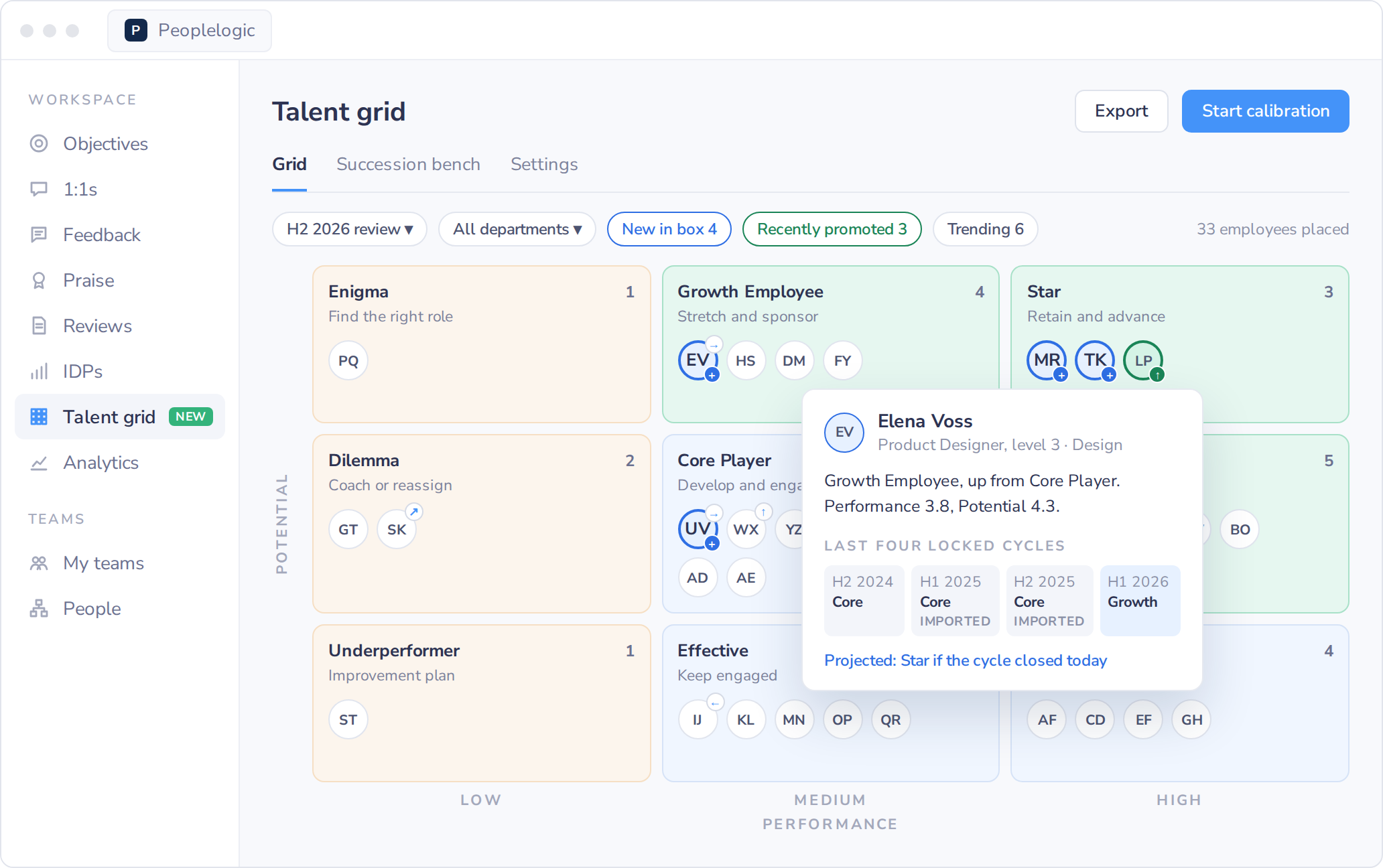
talentgrid
At a smaller company, the talent review lands on one HR person and a spreadsheet.
They export ratings and paste initials into a slide, then start over when a rating changes. Dedicated talent review software is usually built and priced for companies with a talent team.
Keep your review form
Ratings on any scale convert to 1.0 to 5.0
Explain any placement
Each box shows the scores and inputs behind it
A record of every change
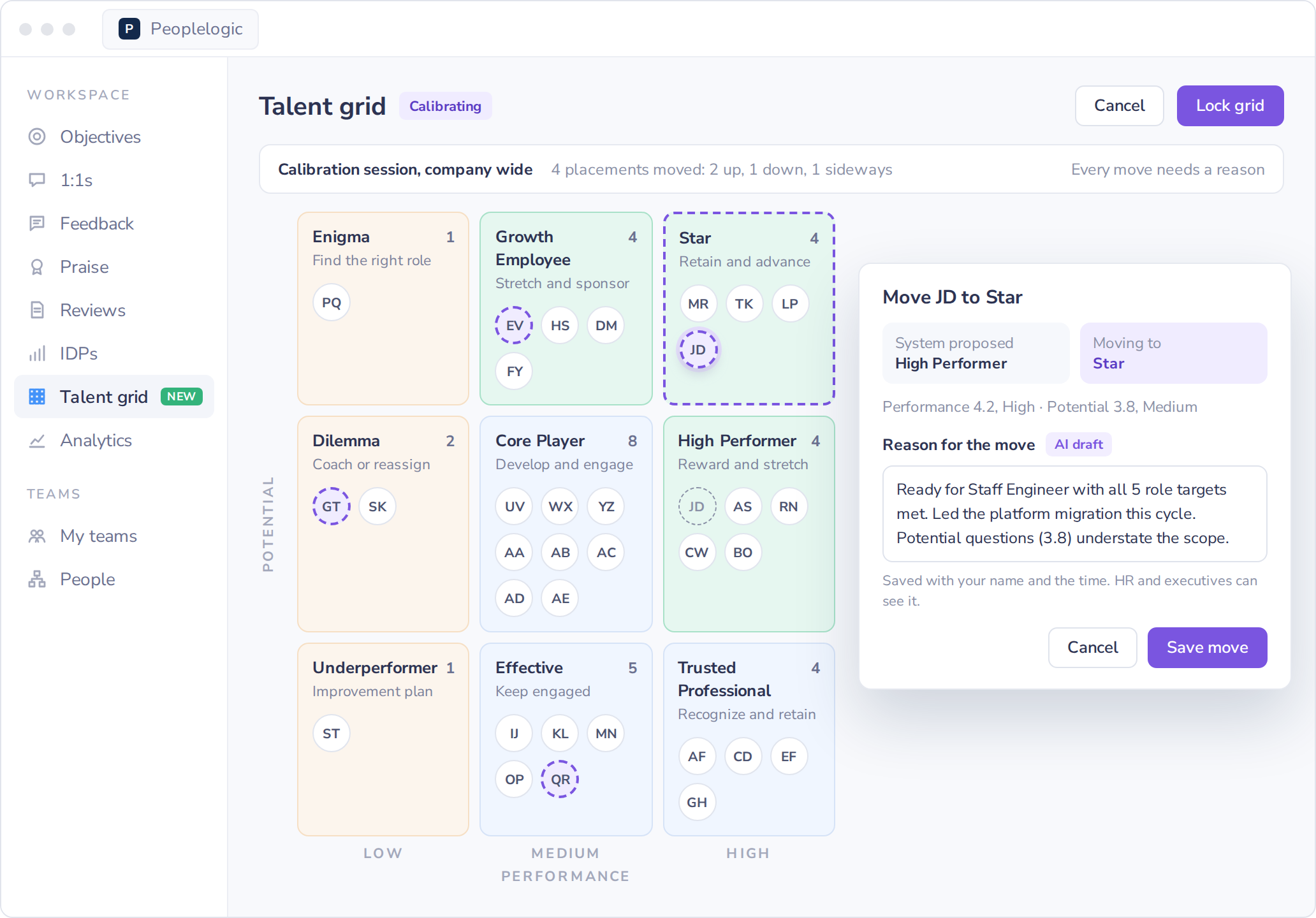
Calibration moves are saved with a written reason
Kept to leadership
HR and executives only. Employees never see their placement
Built for small HR teams
What changes for a one- or two-person HR team
Most of the work in a talent review is prep, such as exporting ratings and building the slide. In Impact that prep is done when the review cycle closes, so HR's time goes into the meeting with your leaders.
- Nothing new to collectPlacements come from the review cycle you already run. If your form has no potential questions, an optional add-on gives managers a few extra questions to answer.
- Ready when the cycle closesEvery reviewed employee has a proposed box within an hour of the review cycle closing.
- One calibration meetingHR and leaders adjust placements together in the grid, with a reason saved for each move. There is no pre-read deck to build.
- Succession for the roles you depend onList the handful of roles the business cannot leave open and see which have no successor ready now.
- A summary for leadershipExport the locked grid and bench to PowerPoint or PDF, with a summary slide drafted from the totals for you to edit.
- Set up with an HR practitionerYour HR practitioner helps you set the weights and plan the first calibration meeting.
Explain any placement in the calibration meeting
Click a person to see their box, both scores and the inputs and weights behind them, so a leader's question gets an answer in the meeting. By default, performance is 60% overall rating, 25% goal attainment and 15% competencies and values, and HR can change the weights.

Finish calibration in one meeting, with no deck to build
Start a session for one department or the whole company. HR moves people between boxes as leaders agree, and every move needs a written reason. Locking the grid saves the cycle so the next one has something to compare against.
Find the key roles with no one ready to step in
HR lists the roles the business cannot leave open. For each one, the bench shows the current holder, named successors and their readiness. HR records whether a successor was told, and nobody is notified automatically.

The nine boxes
Know what to do next for every person on the grid
Performance and potential are each scored from 1.0 to 5.0. Below 2.5 is Low, 2.5 to 3.9 is Medium and 4.0 and above is High. The pair of bands decides the box, and each box comes with a suggested next step.
- StarHigh performance, high potential. Offer a bench slot and hold a retention conversation.
- High PerformerHigh performance, medium potential. Recognize the work and widen their scope.
- Growth EmployeeMedium performance, high potential. Assign a stretch project and a sponsor.
- Trusted ProfessionalHigh performance, low potential. Offer an expert or mentor role and watch for burnout.
- Core PlayerMedium on both axes. Set a development plan and check engagement each cycle.
- EnigmaLow performance, high potential. Review role fit and set a short goal plan.
- EffectiveMedium performance, low potential. Keep them engaged and help them go deeper in their role.
- DilemmaLow performance, medium potential. Coach with clear expectations and frequent check-ins.
- UnderperformerLow on both axes. Start an improvement plan with HR support.
Setup led by an HR practitioner
Your HR practitioner helps you map your review questions to performance and potential, and plan the first calibration meeting with your leaders.
“If you come onboard, the CX team genuinely cares and is always jumping into the mix and helping us figure things out.”
Patricia Amato, Chief of Staff, Chief Executive Magazine
Common questions
Do we need a separate talent review tool?
No. The talent grid is part of Peoplelogic Impact and reads the same employee records as your reviews, IDPs, career lattice and 1:1s. There is no second system to load or keep in sync.
Who can see the grid?
HR admins and executives. Managers do not see the grid in this release, and employees never see their own placement.
What if our review form has no potential questions?
Turn on the optional review question add-on, or map questions you already ask in Settings. Without either, potential is built from the remaining inputs.
Works with the rest of Impact
HR does not enter anything twice. Scores come from the review cycle and IDP skill growth, and each person's panel shows their next role from the career lattice.

Walk through your 9-box with an HR practitioner.
Bring your current grid or a blank spreadsheet. In 30 minutes we show you how it looks in Impact using your own review data.